Disparity range exploration
The user is required to set up pandora2d by specifying a range of disparity to be explored. There are two available methods to do this.
Setting an interval
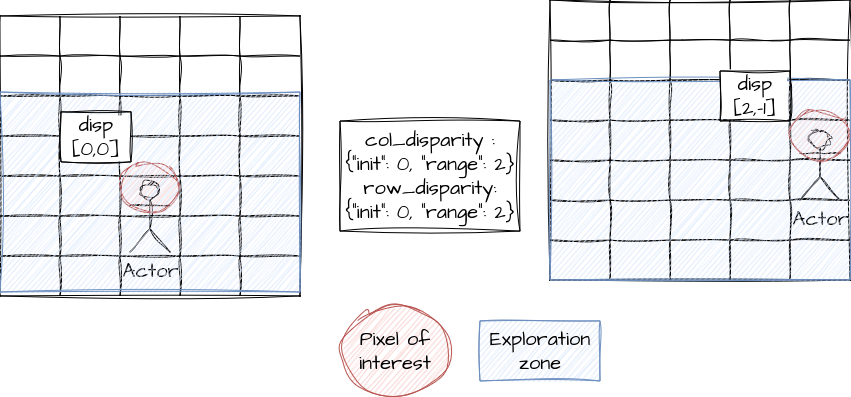
In the configuration file, the user is required to enter disparity range for rows and columns, as a dictionary with 2 keys “init” and “range”.
{
    "input":
        {
            "col_disparity": {"init": 0, "range": 2},
            "row_disparity": {"init": 0, "range": 2}
    }
}
Note
- The “init” key can be either:
an integer if the initial disparity is common to every point in the image.
a path to a disparity grid if each point has its own initial disparity value.
(see Inputs)
The min and max disparity would then be equal to (example for columns):
min_col_disparity = col_disparity["init"] - col_disparity["range"]
max_col_disparity = col_disparity["init"] + col_disparity["range"]
Setting a range
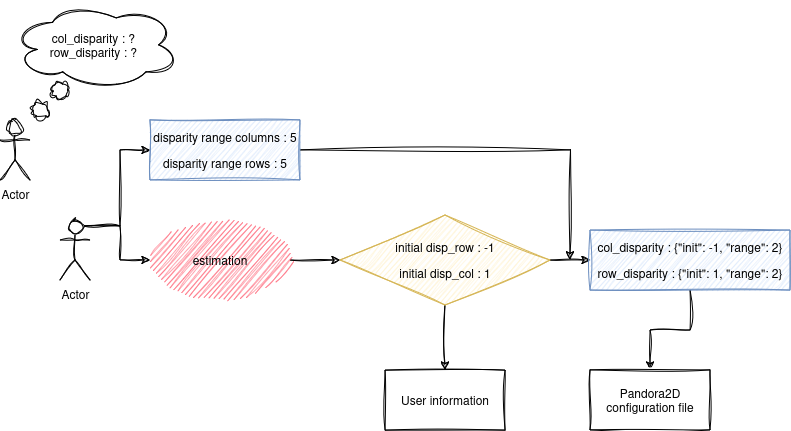
In situations where the user does not know the required interval range, an alternative method is provided. The user must leave the ‘col_disparity’ and ‘row_disparity’ parameters empty. Instead, they need to enable an estimation stage in the pipeline. This stage calculates a global shift throughout the image. By using ‘range_col’ and ‘range_row’ parameters, the user can then approximate an interval around this determined shift.
The following diagram illustrates how the disparity intervals are initialized using the estimation step: